
![What You Can Do With a HubSpot Trial in Just 14 Days [Chart]](https://www.vye.agency/hs-fs/hubfs/Blog/2024/hubspot-trial-featured.jpg?width=1200&height=600&name=hubspot-trial-featured.jpg)
Ever feel like your tech stack is more like a leaning tower of Pisa? We’ve all been there. A different software for every task, and it can get… unmanageable.
But you want to be certain it's the right choice before switching to something new. Will it be worth it for your company? Is this the best option out there?
My team and I have helped dozens of clients make the switch to HubSpot. And this is what we’ve learned about making the most of your free trial.
What a HubSpot free trial gets you
HubSpot is made up of many different tools, including a Customer Relationship Management tool (CRM) and Content Management System (CMS).
The 14-day HubSpot trail gets you access to the Pro version of Marketing Hub. With this access, you’ll be able to:
- Attract and manage new leads with SEO, social media, blog tools, and campaign tools.
- Convert and nurture leads with forms, landing pages, automated workflows, and email marketing tools.
- Create a single source of truth for every contact record with HubSpot Smart CRM.
- Track virtually any metric with pre-built or custom reports.
That’s a lot. So, where to start?
How to make the most of your HubSpot free trial
The goal of a free trial is to decide whether the product is worth the investment, right? While you might not be able to explore every single capability of HubSpot in 14 days, you can see if it helps solve some of your problems.
In addition to the 14 steps below, keep an eye on whether HubSpot helps:
- Improve efficiency by unifying marketing efforts
- Improve visibility into key marketing metrics
Let’s break down each step some more.
Before your trial starts
Sign up for HubSpot CRM
HubSpot offers a free Customer Relationship Management (CRM) tool that allows you to do quite a bit before needing to upgrade. Get familiar with tracking and automating customer interactions to make the most of this tool before starting your trial.
Take a free HubSpot course (or two)
I recommend watching HubSpot Academy's free HubSpot Marketing Software and Inbound Marketing courses. These will give a good idea of how to navigate the platform and what marketing philosophies drive its design.
Explore integrations
Check out the HubSpot App Marketplace to see if — and how — your current tech integrates with HubSpot. Hint: Check out Salesforce, Gmail, and Zoom if you use those platforms.
Identify your users
HubSpot is made for teams. Invite 3-5 people to test out the platform with you and discuss its pros and cons. If you decide to move forward with this platform, you'll want to be sure it works for everyone.
Create a piece of content
In large part, HubSpot is built on the idea of Inbound Marketing, a philosophy that relies on quality content to attract customers. For your HubSpot trial, I recommend creating a guide that helps solve one of your customer's problems. This should be more than a blog but less than an e-book — something a customer might be willing to provide their name and email in order to get.
Gather your contact list.
Identify the names and email addresses of users who’ve engaged with your brand but have not yet purchased. If you’ve taken advantage of the CRM, you likely already have some lists to choose from.
Once your trial starts
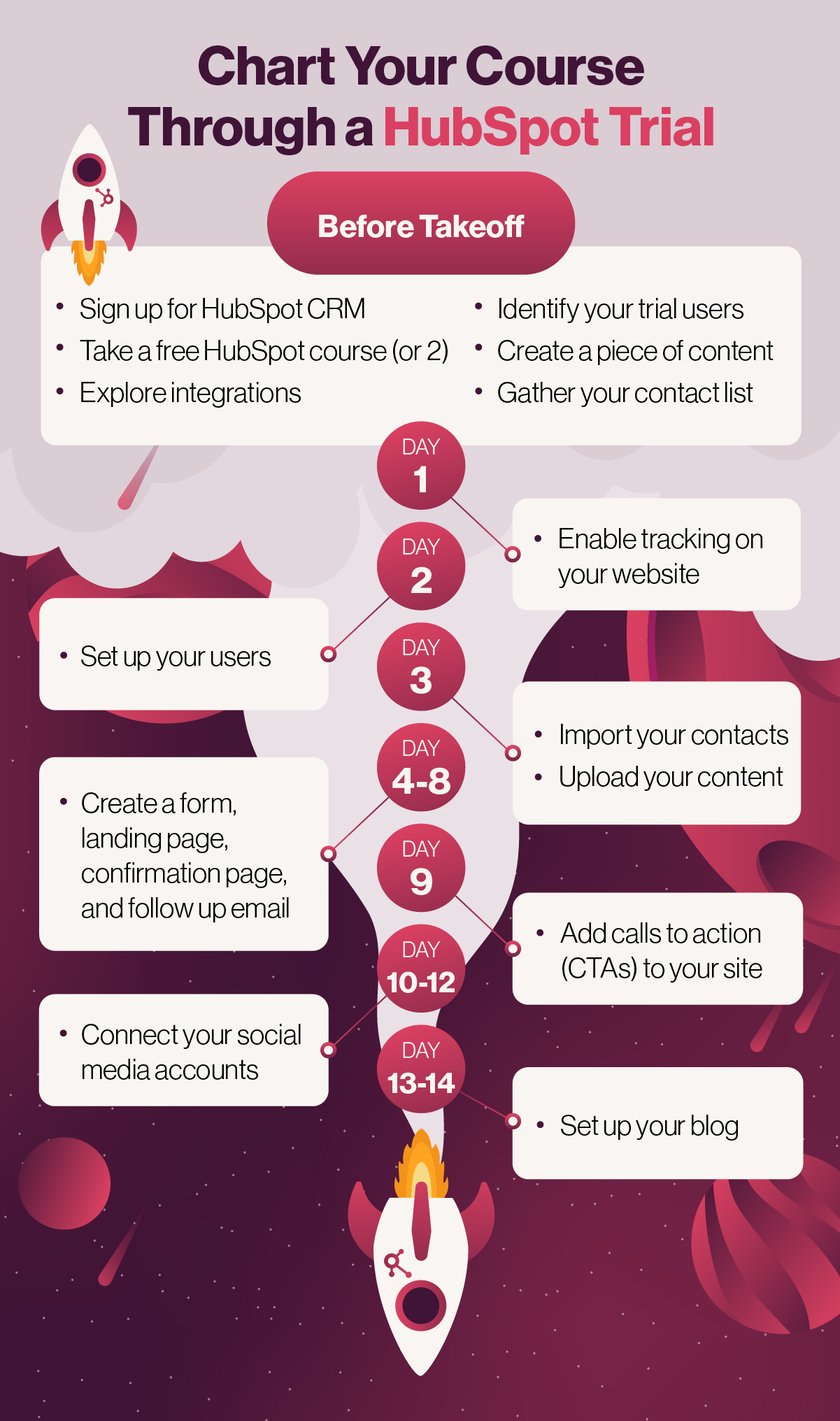
Day 1: Enable tracking on your website
If you don’t do anything else, do this: Install the tracking link on your site to start gathering user data. One of the big advantages of HubSpot is tracking and reporting to help you improve your marketing strategies.
Day 2: Set up your users
Make sure everyone on your team is equipped to explore the platform. One benefit of Marketing Pro is phone support from HubSpot so you can simply call if you run into any issues.
Day 3: Import your contacts
Familiarize yourself with the difference between an active and static list, regardless of which you decide to use. Upload your content as a file so that users can download it in the next step.
Days 4-8: Create a form, landing page, confirmation page, and follow-up email
Don’t worry; you’ll cover how to do each of these in the HubSpot Marketing Software course. HubSpot’s drag-and-drop design makes it easy. This step will allow you to capture and nurture leads who want to access your content.
Day 9: Add calls to action (CTAs)
Add CTAs to your site that drive to your content offer.
Days 10-12: Connect your social media accounts
Connect your social media accounts and start promoting your content.
Days 13-14: Set up your blog
Set up your blog and post an abbreviated version of your guide with a CTA to access the full thing.
While there are many, many more things that HubSpot is capable of, completing these steps during your free trial is a great start. You’ll learn how to:
- Navigate key parts of the software
- Use HubSpot to generate leads
- Gather data to improve your strategies
Key takeaways
- A 14-day HubSpot trial gives access to the full Pro version of Marketing Hub, not a stripped-down demo.
- Prep work before the trial starts, like drafting content and compiling a contact list, makes the 14 days far more productive.
- The day-by-day plan builds toward one real campaign launch: a form, landing page, follow-up email, and blog post.
- The unified CRM and contact record are often the most valuable part of the trial, since they show the full funnel in one place.
- Vye offers onboarding and optimization support for companies that want help getting a new HubSpot account fully set up after the trial.
Frequently asked questions
How long does a HubSpot free trial last?
A HubSpot free trial lasts 14 days and includes access to the Professional tier of Marketing Hub. That gives you enough time to test forms, landing pages, workflows, and reporting, not just browse the dashboard.
What should I do on day one of a HubSpot trial?
On day one of a HubSpot trial, install the tracking code on your website so HubSpot starts collecting visitor data immediately. Every day after that builds on data collected from day one forward, so this step shouldn't wait.
Can I really launch a campaign during a 14-day trial?
Yes, a 14-day trial is enough time to build and launch a real campaign, including a form, landing page, follow-up email, and a blog post promoting a content offer. Following a day-by-day plan is what makes this possible within the trial window.
HubSpot onboarding doesn't have to be complicated
Needless to say, there’s a lot to HubSpot. But when used correctly, it can transform your business.
One way to ensure you’re getting the most out of HubSpot is to bring in a HubSpot Partner marketing agency like Vye.
What the heck is a HubSpot Partner? In the short term, it means we have experts on our team who can walk you through onboarding and optimizing your subscription. Plus, you'll gain access to our full-service, in-house experts who can handle everything from content creation to web design and in-depth reporting to help you attract and convert your customers.
Ready to get started? Let us know — we’re here to help!
